
Table of Contents
Setting a Replay Type
Removing a Replay
Server Recordings
Replay & Recording Retention Period
Retention Timeline
Setting a Replay Type
Replay Types are how replays are organized on COGWA TV. Each Replay Type can be assigned to a single webcast. Replay Types allow you to have two Sabbath Service replays as well as a Bible Study replay and the various Holy Days.
Please do not use the Holy Day replay types for other types of webcasts, like a regular weekly Sabbath service.
To set a replay, go to the Webcasting > Replays section from the navigation. In the list of replays, click on the row for a webcast:
Click the dropdown next to "Replay Type" to select a replay type:
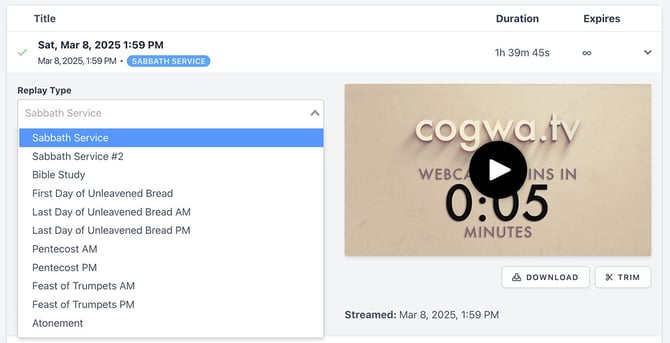
Once the Replay Type is selected, the Retention Period is set and it'll updated the "Expires" column with the new Retention Timeline.
Removing a Replay
There are two options if you no longer want a replay available.
1. Set a new replay for a particular Replay Type. Choosing a new replay for "Sabbath Service" will make that new replay available and the previous replay will remain in the replay list until the retention period is over.
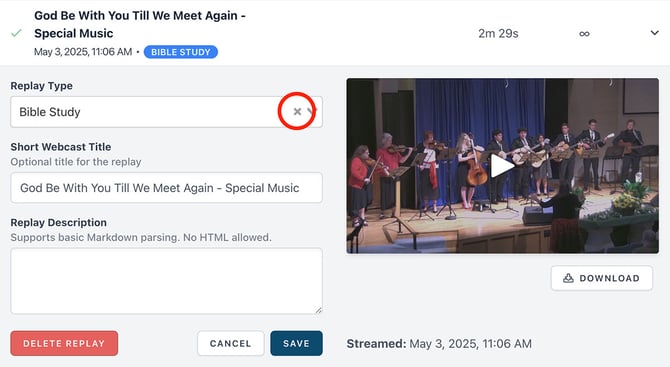
2. Click the "X" in the Replay Type field and then save the replay.
Server Recordings
A recording of a webcast is available as an MP4 file. Recordings are linked to the replay they're created from. Once the replay is deleted the recording is as well. If you need the server recording for any reason, it's best to download it as soon as possible.
Once the replay and its recording is deleted, it can no longer be downloaded or recovered.
It's always recommended to record locally and not rely on the server’s recording in case there are streaming issues. For example, "Webcast offline" messages are included in server recordings.
Replay & Recording Retention Period
In order to manage the amount of server space used by webcast replays and recordings, management rules are in place to remove replays and recordings.
Replays and recordings are only stored on the server for a limited amount of time. This is called the Retention Period. Replays and recordings are automatically removed after the Retention Period unless stated otherwise.
Sabbath Service and Bible Study replays along with their recordings will never be automatically deleted. These replay types have an infinite Retention Period.
Once the Retention Period has passed, the Replay Type is automatically removed from the replay and one additional day gets added to the Retention Period. This extra day prevents accidental changes to the replay from triggering an instant deletion.
For example, a replay that has the Replay Type “First Day of Unleavened Bread” will have a Retention Period of 28 days. After 28 days, the Replay Type will be removed and the replay will no longer be publicly available. The Retention Period will be changed to one day and will automatically be removed the next day.
Retention Timeline
| Replay Type | Retention Period (days) |
|---|---|
| Sabbath Service | Infinite |
| Sabbath Service #2 | 168 |
| Bible Study | Infinite |
| First Day of Unleavened Bread | 28 |
| Last Day of Unleavened Bread AM | 28 |
| Last Day of Unleavened Bread PM | 28 |
| Pentecost AM | 28 |
| Pentecost PM | 28 |
| Feast of Trumpets AM | 42 |
| Feast of Trumpets PM | 42 |
| Atonement | 42 |